Resume studio for every career stage

A resume built like engineered work, not a template.

Resume Architect is a focused studio for crafting resumes that earn interviews - whether you are stepping into your first role, switching industries, or moving up at the senior level.

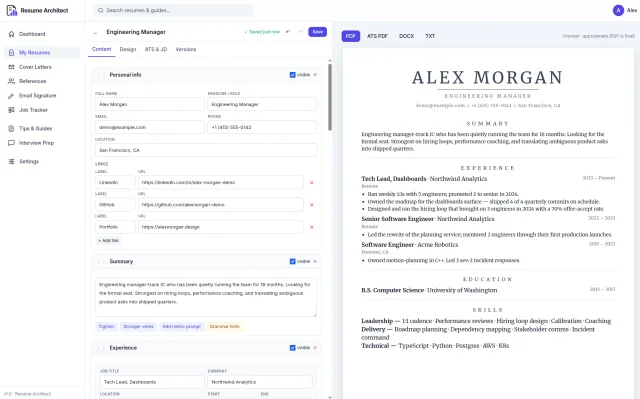
The Resume Architect resume editor showing an engineering manager resume with a live PDF preview.
Built for every career stage

From your first application to your final career pivot.

A resume is a long-running artifact. Resume Architect treats it that way - with structure, precision, and the same care a senior engineer brings to a system they actually rely on.

First job

Translate coursework, internships, and side projects into bullets a hiring manager will actually read.

Early career

Shape two to five years of experience into a focused narrative - without resorting to filler.

Senior & lead

Tighten dense histories into a sharp document recruiters can scan in thirty seconds.

Career change

Reframe what you have already done so it lines up clearly with the role you want next.

What you can build

A real studio for the documents that get you hired.

Three connected workspaces, each focused on one part of the job search - and built to feel calm to work in, not noisy.

Resume builder

A resume editor that works the way you actually think.

Drag sections into the order you want, across thirteen section types - Personal, Summary, Experience, Education, Skills, Projects, Certifications, Languages, Awards, Publications, Volunteer, Hobbies, and References. Tune the accent color, font family, density, heading scale, line height, and paper size (Letter or A4). Write in any language.
Cover letter builder

Write cover letters in a workspace built for them.

A separate editor with its own recipient block, subject, and body. Link a cover letter to a resume so the two travel together, and export to PDF when you are ready to send it out.

ATS score & suggestions

See how your resume reads to an ATS - before you submit.

Paste the job description. Resume Architect scores how closely your resume matches and surfaces specific suggestions to tighten bullets, sharpen verbs, and pull in the language the posting is actually using.

The small things that keep work moving

Quiet conveniences you stop noticing - in a good way.

Live preview

Every edit and color choice appears immediately in a real rendering of your resume.

Autosave

Edits save themselves in the background. No save button to remember, nothing to lose to a tab crash.

Version history

Every change is snapshotted. Browse past versions, compare them side-by-side, and restore anything in one click.

One-click exports

Download any resume or cover letter as PDF, DOCX, or plain text whenever you need to send something out.

Global search

One search box across your resumes, cover letters, applications, references, and the resume tips library.

Duplicate, trash & restore

Clone any resume to spin off a variant. Soft-delete anything you do not need, and restore it later - or empty the bin for good.

Dashboard

A quiet home screen with counts of what you have going and quick links back to whatever you were last working on.

Resume Tips library

A growing collection of practical career writing - resumes, ATS, cover letters, LinkedIn - with one-tap bookmarking.

See it in action

A closer look at the workspaces.

Six pieces of the product, each shown in its real shape - not a marketing mockup.

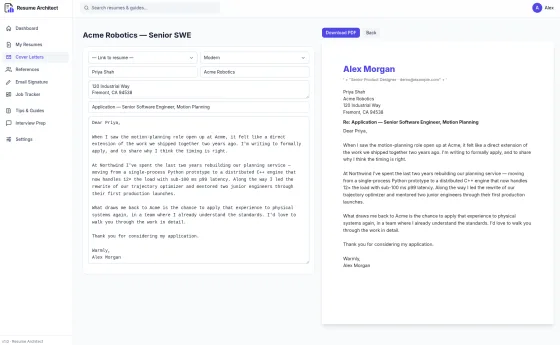
The Resume Architect cover letter editor with a recipient block, body, and live PDF preview.
Cover letter builder

A real workspace for the letters, not a textarea afterthought.

Fill the recipient block, write the body, and watch the PDF render live next to you. Link a cover letter to the resume it belongs with so they stay together, and download the finished PDF whenever you are ready to send it.

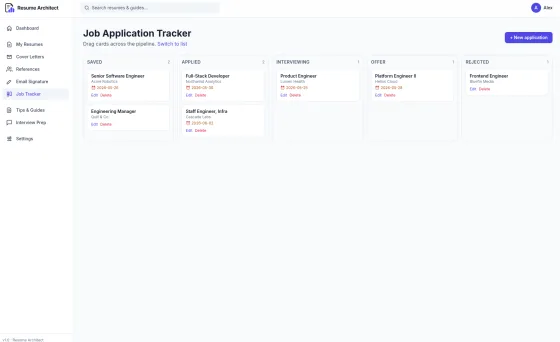
Job application tracker showing Kanban columns for Saved, Applied, Interviewing, Offer, and Rejected.
Job application tracker

Every application, every follow-up, on one Kanban board.

Move cards across Saved, Applied, Interviewing, Offer, and Rejected. Each one holds the role title, company, follow-up date, recruiter contact, and your notes. Drag to reorder, switch to a list view when you want the long picture, and never lose track of who you still owe a reply to.

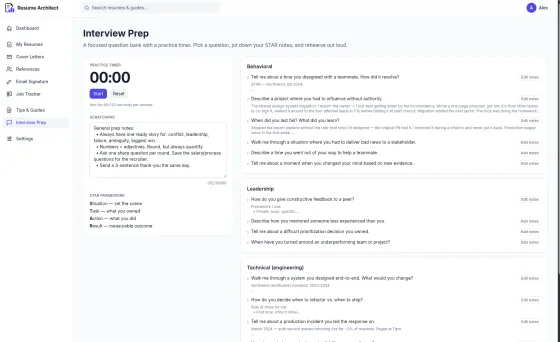
Interview Prep page with a practice timer, STAR scratchpad, and a behavioral question bank.
Interview prep

Rehearse with a real question bank and a real clock.

Behavioral, leadership, technical engineering, and technical design questions, ready to practice against. A built-in timer keeps your answers tight, a STAR-format scratchpad keeps your notes structured, and everything autosaves so the work you put in last week is still there next week.

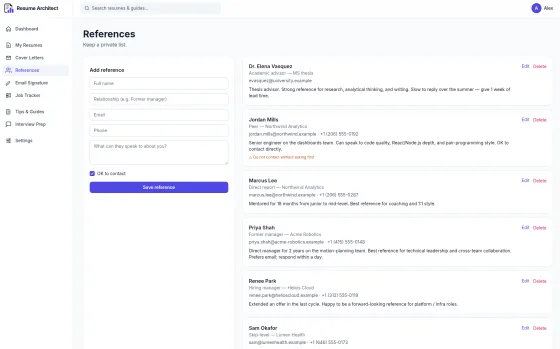
References book showing several contacts with relationship, email, phone, and private notes.
References book

A private, organized list of the people who vouch for you.

Store each reference with their relationship to you, email, phone, an "okay to contact" flag, and the private notes that remind you when and how to reach out. When a recruiter asks, you have everything ready in one place instead of digging through old threads.

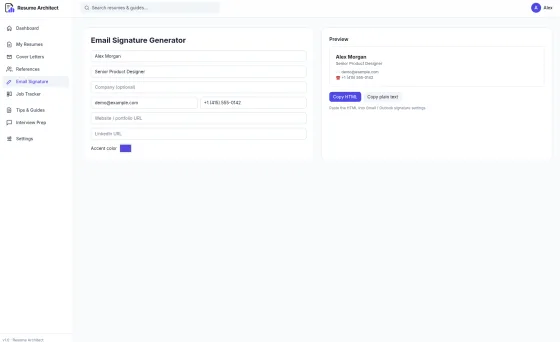
Email Signature Generator with a form for name, role, contact, links, and accent color, and a live preview.
Email signature generator

A clean email signature, in about ninety seconds.

Fill in your name, role, company, contact details, and links. Pick an accent color. Watch the signature render live as you type. Copy the result as HTML for Gmail or Outlook, or as plain text - and paste it straight into your email settings. No image attachments, no broken layouts in dark mode.

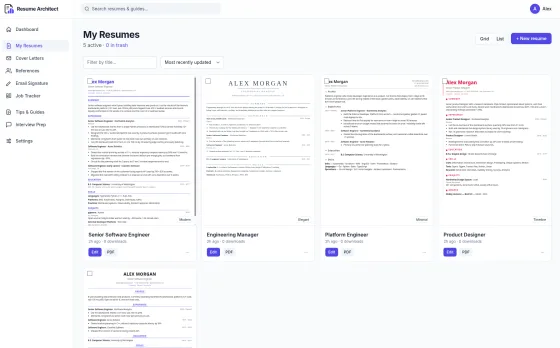
My Resumes view showing a grid of five resume thumbnails with edit and PDF buttons on each card.
Manage all your documents

Every resume you have ever written, one click away.

Your library lives on one screen. Switch between grid and list views, filter by title, sort by most recently updated, and act on any card without opening it - duplicate to spin off a variant, grab the PDF, send a copy to trash, or restore something you wanted back. Nothing important goes missing.

In the wild

What people use Resume Architect for.

A handful of the situations our writers find themselves in. None of these are testimonials - they are the shape of the work the product was built around.

A laptop, coffee mug, and notebook on a warm wooden desk by a sunlit window.
Sunday rewrite

A senior PM cleaning up ten years of experience.

Pulling fifteen roles into a single focused page without losing the work that defines the last decade. Live preview makes the trade-offs visible while they happen.

A person speaking into a laptop webcam during a video interview in a quiet home office.
Night before

An engineer rehearsing tomorrow’s loop.

Behavioral questions in one tab, the STAR scratchpad in the other, a clock running. Practice answers stay saved for next time.

A person reading from a tablet while sitting on a sunlit window sill.
Career pivot

A teacher moving into UX research.

Reframing classroom and curriculum experience as user research, study design, and stakeholder communication - line by line, without inventing anything.

Two professionals reviewing a printed document together at a bright modern office table.
Second pair of eyes

A friend reviewing the draft before it goes out.

Two windows, one resume, a shared link. The PDF preview is the single source of truth - no copy-pasting into a doc.

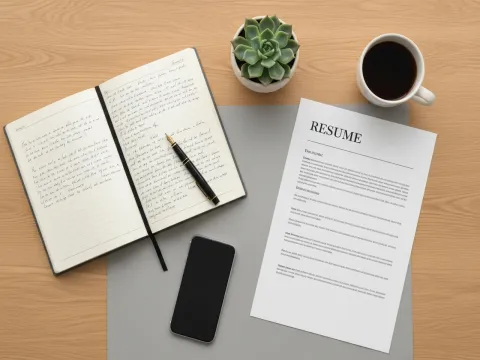
A flat lay of a notebook, fountain pen, printed resume, plant, and tea cup on a wooden desk.
Job search week one

Setting up the tracker before the search begins.

A list of saved roles, a follow-up cadence, and a references shortlist already in the book. The first application goes out the same evening.

A senior professional reviewing notes at a clean modern conference table.
Executive search

A leader tightening the narrative.

Less is more at the top. Compact density and a summary that does the work three pages used to.

A resume worth the role you actually want.

Create your free account and draft your first version in about a minute.